


我想對於vim和gdb的搭配,最完美的組合莫過於vimgdb這個patch了。前一陣子在苦腦怎麼樣的環境會讓我操作gdb這個神器最順手呢?! 讓我能夠remote debugging在ARM開發板上的程式得心應手呢 ^^ ?! 先來張snapshot吧!
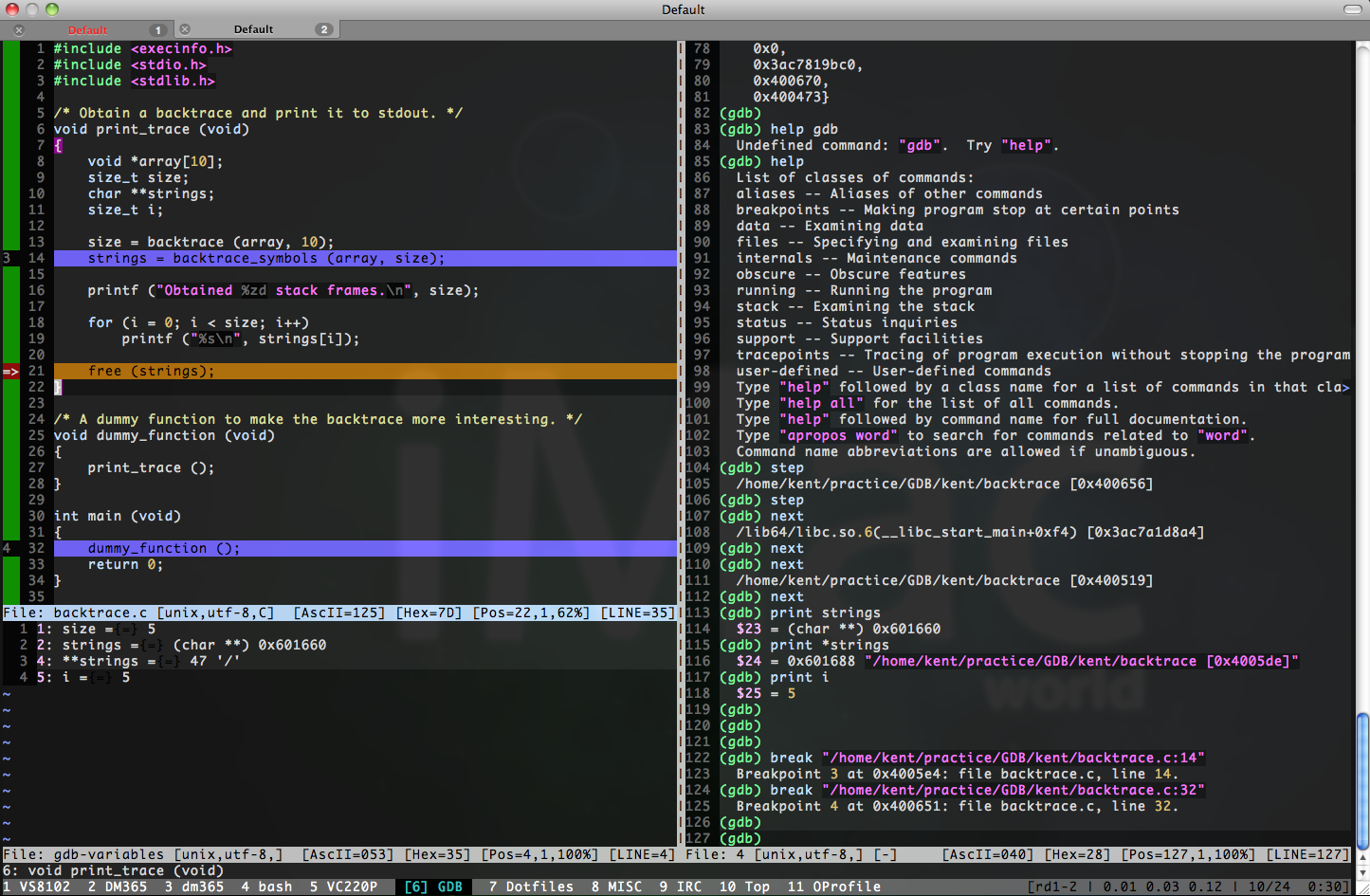
※你看,在PTT->LinuxDev版上,連宅色夫(jserv)大神都推薦,沒道理不用呀...囧rz

在X11(X-Window)的底下的話,DDD, Insight都還算順手,但這時就得在PC上跑個X Server (推薦 Xming: X Server for Windows),有點太浪費資源了,有時只為解個小bug,我想不用出動ddd, insight這種機絲吧。
在Console底下的話,我想 gdb --tui 或是 cgdb 就蠻好用了,但身為一個VIMer,若能將gdb整進vim就更完美了,果然你想到的東西,別人都想過了...也作好了...XD! Great,有現成的就直接拿來用啦。用過之後,越來越順手,反應速度當然也比ddd,insight這些x11的app快些,果然還是CLI模式順手呀。
Clewn(for gVim) / vimGdb(for Vim) 官網:

http://clewn.sourceforge.net/index.html
安裝過程很簡單,只要三個部驟。首先,去vim官網抓這包source code (vim-7.2.tar.bz2),接著抓vimgdb(for vim72)這個patch檔。最後就是先解開以上兩包,再上patch啦。官網教學在此,小結如下:
1. tar xjf vim-7.2.tar.bz2
2. tar xzf vimgdb72-1.14.tar.gz
3. patch -d vim72 --backup -p0 < vimgdb/vim72.diff
4. cd vim72
#重點是configure時,記得加上--enable-gdb這個參數
5. ./configure --enable-cscope --enable-gdb --enable-multibyte --disable-gui --enable-gui=no --without-x --disable-gpm --disable-nls --with-tlib=ncurses --enable-pythoninterp --prefix=/home/kent/usr/
6. make && make install
NOTE: 在Ubuntu 9.10 和 Snow Leopard (Mac OS X 10.6.2)底下build這vim時遇到了一個問題,build出來的vim,一跑起來就出現 *** buffer overflow detected ***: ./vim terminated ,後來Google之後,也有人遇到這個問題,後來繼續追下去,追到GNU gcc的bugzilla去了,有人發了一個bug給gcc : vim crashes on startup when compiled with -O3 but works with -O2,裡頭提到產生這問題的關鍵點,記錄一下,或許以後會遇到,最終這個bug被歸類為 "RESOLVED INVALID"
===============================================

NOTE: In Ubuntu 8.10 and later versions, -D_FORTIFY_SOURCE=2

is set by default, and is activated when -O is set to 2 or higher.

This enables additional compile-time and run-time checks for several

libc functions.  To disable, specify either -U_FORTIFY_SOURCE or

-D_FORTIFY_SOURCE=0.

===============================================

The difference between -D_FORTIFY_SOURCE=1 and -D_FORTIFY_SOURCE=2

is e.g. for

struct S { struct T { char buf[5]; int x; } t; char buf[20]; } var;

With -D_FORTIFY_SOURCE=1,

strcpy (&var.t.buf[1], "abcdefg");

is not considered an overflow (object is whole VAR), while

with -D_FORTIFY_SOURCE=2

strcpy (&var.t.buf[1], "abcdefg");

will be considered a buffer overflow.

============================================
所以,在 Ubuntu 及 Snow Leopard 底下,若要build vim from source的話,請記得加上 CFLAGS="-O3 -D_FORTIFY_SOURCE=1",將我常用的configure參數記錄如下:
./configure --enable-multibyte --enable-cscope --disable-gui --enable-gdb --prefix=/Users/kent/usr/ CFLAGS="-O3 -D_FORTIFY_SOURCE=1"


